What is your legal basis?
According to the Data Protection Authority (GBA/APD), the employer is in principle authorised from the outset to process employee data in order to exercise its rights and obligations under employment law: contractual necessity, legal necessity and business interest.[1] Those three grounds are in article 6 of the GDPR.[2]
Where a registration obligation already exists today, such as with flexible working hours (glijdende uurroosters) or for deviations by part-time employees, you process the times because the law requires it.[6][7]
Consent is a weak basis in an employment relationship. For biometrics, the GBA expressly points out that consent is not a valid ground because of the relationship of authority, and that a clear legal basis is needed.[5]
Informing your employees
Employees must know that their data are processed and for what purpose, at the moment you collect them, so when the employment contract is signed.[1] Article 13 of the GDPR lists what that information contains, including the purpose, the legal basis, the retention period and the rights of the data subject.[2]
If you also use an access badge to record arrival and departure times, you must inform your employees about that.[3] The work regulations (arbeidsreglement) are a logical place to describe how you measure and monitor working time.
Who sees what?
The GDPR requires you to process no more data than necessary,[2] and the GBA applies the principle of proportionality to monitoring employees.[1] In Klox, what someone sees depends on their role:
| Role | Sees | May |
|---|---|---|
| Employee | Only their own registrations and corrections | Clock in and out, take breaks, export their own hours, request a correction |
| Manager | The employees of their department and the departments below it, once departments have a person in charge; otherwise all employees. In the audit log, only their own actions | Record corrections and missing clock actions with a reason, handle correction requests, export |
| HR | All employees, their registrations and the audit log | Read and export; not record corrections or clock actions |
| Owner | All employees, registrations and the audit log, and is the only one who sees the IP addresses | Everything, including settings, billing and the data processing agreement |
Every correction, export and automatic clock-out goes into the audit log with the time, action and author. Klox also records the IP address and browser there as a security trail; the web app shows them to no one, and the API only gives the IP address to the owner.
The employee's right of access
Every employee has the right to access and obtain a copy of their personal data.[2] With flexible working hours, the employee must also be able to consult the time-tracking system,[6] and a time-tracking system for part-time employees must also be available for consultation by the employees concerned.[7]
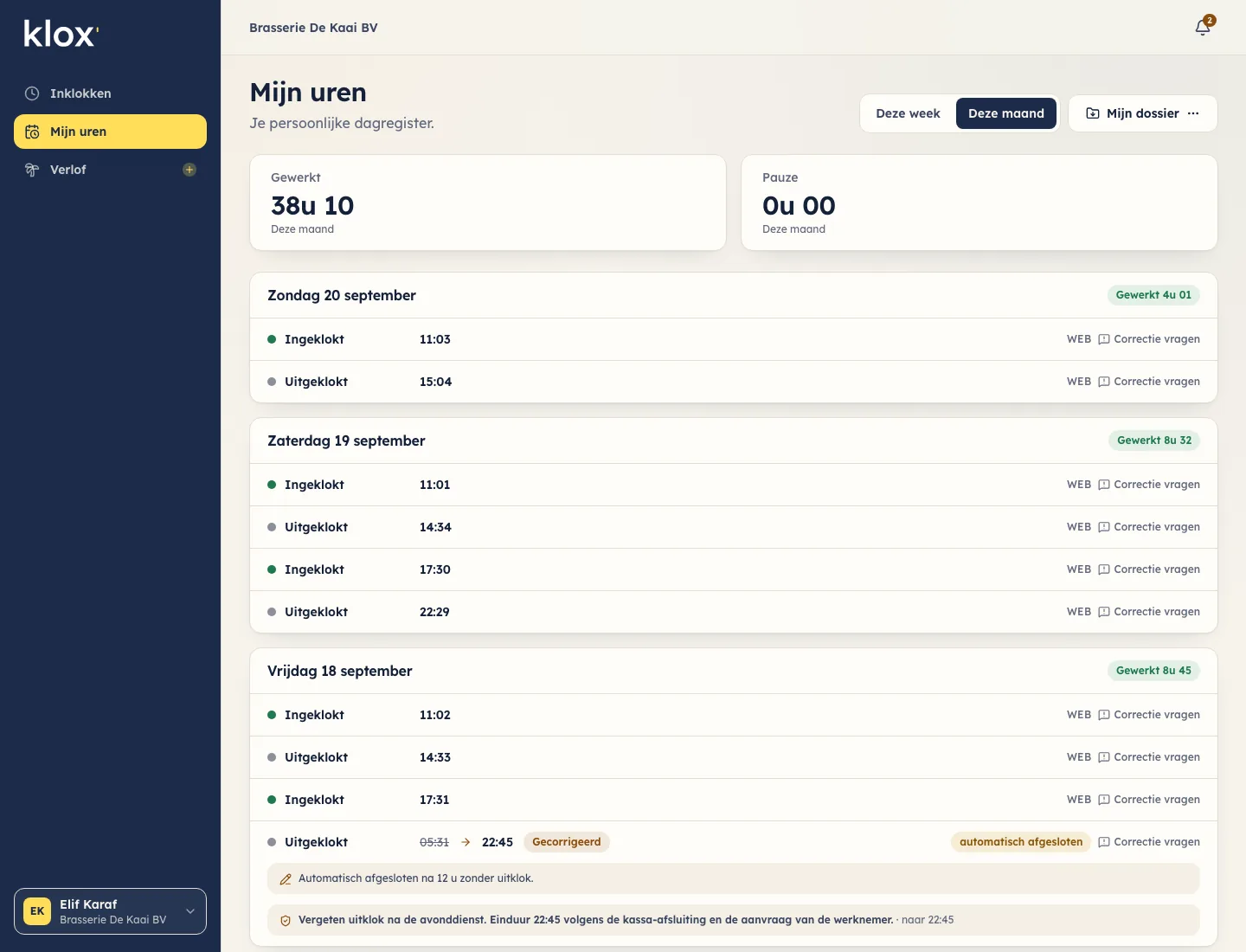
In Klox, the employee sees under "My hours" the same registrations and corrections as the employer, with the reason for each correction. Through "My file" they export their own hours as PDF or CSV. If something is wrong, they request a correction from that same screen.
Location data and biometrics
There are no specific rules for the geolocation of employees. The GBA deals with it under the GDPR, article 8 of the European Convention on Human Rights and article 22 of the Belgian Constitution, and calls permanent monitoring with systematic read-outs disproportionate in principle. That GBA page is about geolocation in vehicles, not about clocking in with a smartphone.[4]
Biometrics, such as a fingerprint or facial recognition, is a special category of personal data. A biometric template is preferably kept only by the employee themselves, and a central database only in exceptional cases.[5]
What the rule says
What Klox does
How long do you keep the data?
The GDPR requires you not to keep personal data longer than necessary for the purpose.[2] There is no general legal retention period for time registration: it depends on the scheme. With flexible working hours it is five years after the end of the day the data relate to,[6] and for deviations by part-time employees also five years.[7]
What the rule says
What Klox does
Data processing agreement and EU hosting
For your employees' data, you as the employer are the controller. The supplier of your time registration is a processor, and article 28 of the GDPR requires an agreement that sets out how it handles those data.[2]
At Klox, the data processing agreement is included as standard in every subscription. The application and the database run at Hostinger, in a data centre in Frankfurt (Germany). The agreement also lists the other subprocessors: Brevo for email and Mollie for payments. Cloudflare is only the DNS provider: traffic does not pass through it, and it processes no content of the service and no personal data of employees. For the data of visitors and account holders, for which Klox itself is responsible, the privacy policy applies.
Checklist for the employer
1. Define the purpose and legal basis
Why do you record time: an existing legal obligation, the performance of the contract, or your business interest? Write it down.2. Inform your employees in advance
When the contract is signed, and in your work regulations: what you record, why, for how long and who sees it.3. Limit who has access
Give managers access to their own team only, and HR read-only rights if that is enough.4. Collect no more than necessary
Times and corrections are enough for time registration. Location and biometrics need a separate, strong justification.5. Arrange access and retention
The employee must be able to see and receive their own data. Set the retention period for each scheme.6. Sign a data processing agreement
With every supplier that processes the data for you, and check where the data are stored.
Which registration obligations already apply today and what has been announced for 2027 is explained on time registration mandatory in 2027?
Sources
- [1]Processing of employees' personal data (in Dutch), Data Protection Authority (GBA/APD), accessed on 22/09/2026
- [2]General Data Protection Regulation (GDPR), Regulation (EU) 2016/679 (in Dutch), EUR-Lex, accessed on 22/09/2026
- [3]Identification and monitoring of staff (in Dutch), Data Protection Authority (GBA/APD), accessed on 22/09/2026
- [4]Geolocation (in Dutch), Data Protection Authority (GBA/APD), accessed on 22/09/2026
- [5]Biometrics in the workplace (in Dutch), Data Protection Authority (GBA/APD), accessed on 22/09/2026
- [6]Labour Act of 16 March 1971, article 20ter, §5 (flexible working hours) (in Dutch), Justel, Belgian Official Gazette, accessed on 22/09/2026
- [7]Monitoring the work of part-time employees (in Dutch), FPS Employment, Labour and Social Dialogue, accessed on 22/09/2026
Further reading
See how Klox handles this for your team?
Try it free for fourteen days with your own team, no payment details needed. Your account is ready in a few minutes.