What an inspector can review today
Belgium currently has no general obligation to record the working time of every employee. For a number of arrangements and sectors, that obligation does exist.[1] What you need to be able to show therefore follows from each employee's situation. Below are the situations that can come up in an SME with 1 to 20 employees.
| Situation | What you keep | Retention | Source |
|---|---|---|---|
| Flexible working hours (glijdende uurroosters) | A time-tracking system with, per employee, their identity and, per day, the duration of the work performed. Accessible to the employee and to the designated official. | 5 years after the end of the day | [2] |
| Part-time workers who deviate from their schedule | A deviation document (deviation register for part-time workers), or a time-tracking system with the start, end and rest breaks for each day. | 5 years | [3] |
| Part-time workers with a variable schedule | The written, dated notice with the schedule. | 1 year | [3] |
| Flexi-job workers | A record of the work performed, using one of the methods listed by the National Social Security Office (RSZ/ONSS). | See the RSZ/ONSS page | [4] |
| Employers with staff | The social documents that apply to you, such as the individual account. | 5 years | [5] |
In addition, the work regulations (arbeidsreglement) state, among other things, the methods used to measure and monitor work, and you send a copy to the inspectorate within eight days of them taking effect.[6] How to update those regulations is explained in the article on work regulations under “Further reading” below.
What a readable file contains
A file holds up if someone who knows neither your business nor your software can find their way through it without explanation. Per employee and period, that means: who it is, which period it covers, every clock action per day with its time, a daily total, and for every changed time what was originally recorded, why it changed, who changed it and when.
What the rule says
What Klox does
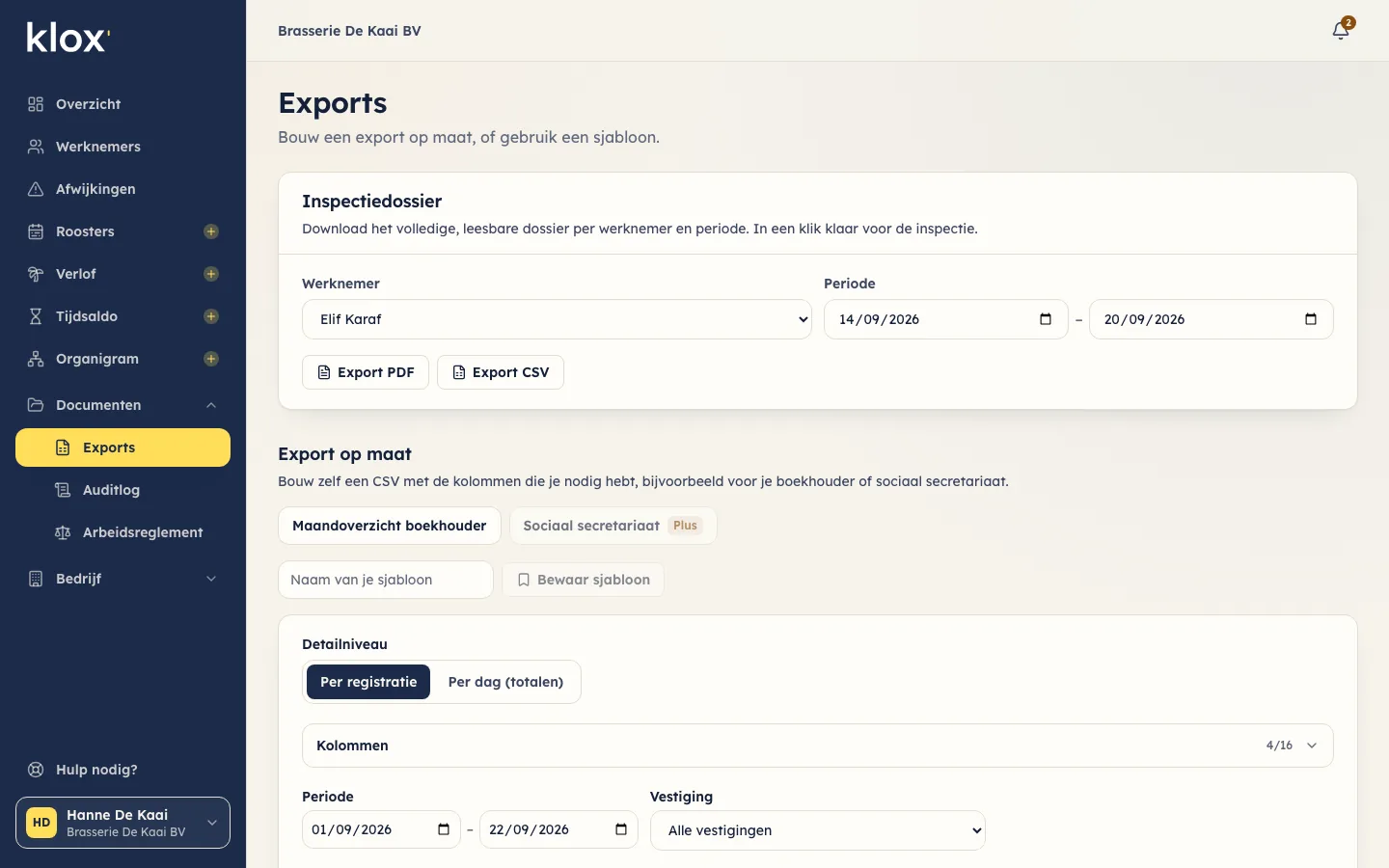
The example export
Below is a real export from Klox, made with a fictitious business: Brasserie De Kaai BV in Ghent, with floor staff member Elif Karaf, for the week of 14/09/2026 to 20/09/2026. The VAT number is a dummy number. The PDF is what you hand to an inspector; the CSV contains the same lines and opens in Excel. This example is in Dutch.
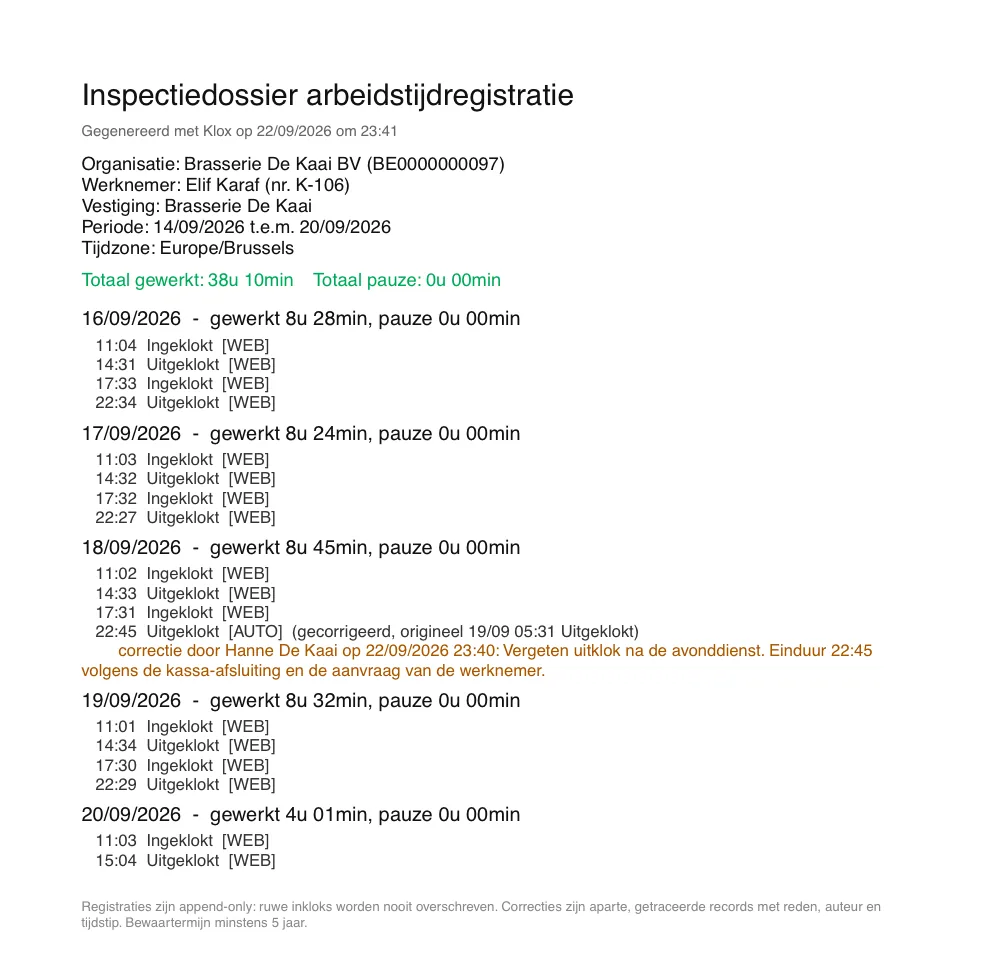
Real export from Klox with fictitious data, in Dutch. Not an official template.
Semicolon as separator, opens in Excel. In Dutch.
The lines for Friday 18/09/2026 from that CSV show how a correction ends up in the file:
| Time | Type | Source | Corrected | Original | Reason | By | Corrected on |
|---|---|---|---|---|---|---|---|
| 11:02 | Clocked in | WEB | no | ||||
| 14:33 | Clocked out | WEB | no | ||||
| 17:31 | Clocked in | WEB | no | ||||
| 22:45 | Clocked out | AUTO | yes | 19/09/2026 05:31 | Forgot to clock out after the evening shift. End time 22:45 according to the till closing and the employee's request. | Hanne De Kaai | 22/09/2026 23:40 |
The source WEB means the employee clocked in herself in the browser. AUTO means Klox closed the shift automatically. The CSV also has a column showing whether a clock action was made offline. Based on the raw clock actions alone, Friday would count as 15h 31 worked; with the correction it is 8h 45, and both times remain visible.
A forgotten clock-out, from start to export
Take a forgotten clock-out after an evening shift. This is how it went in the example:
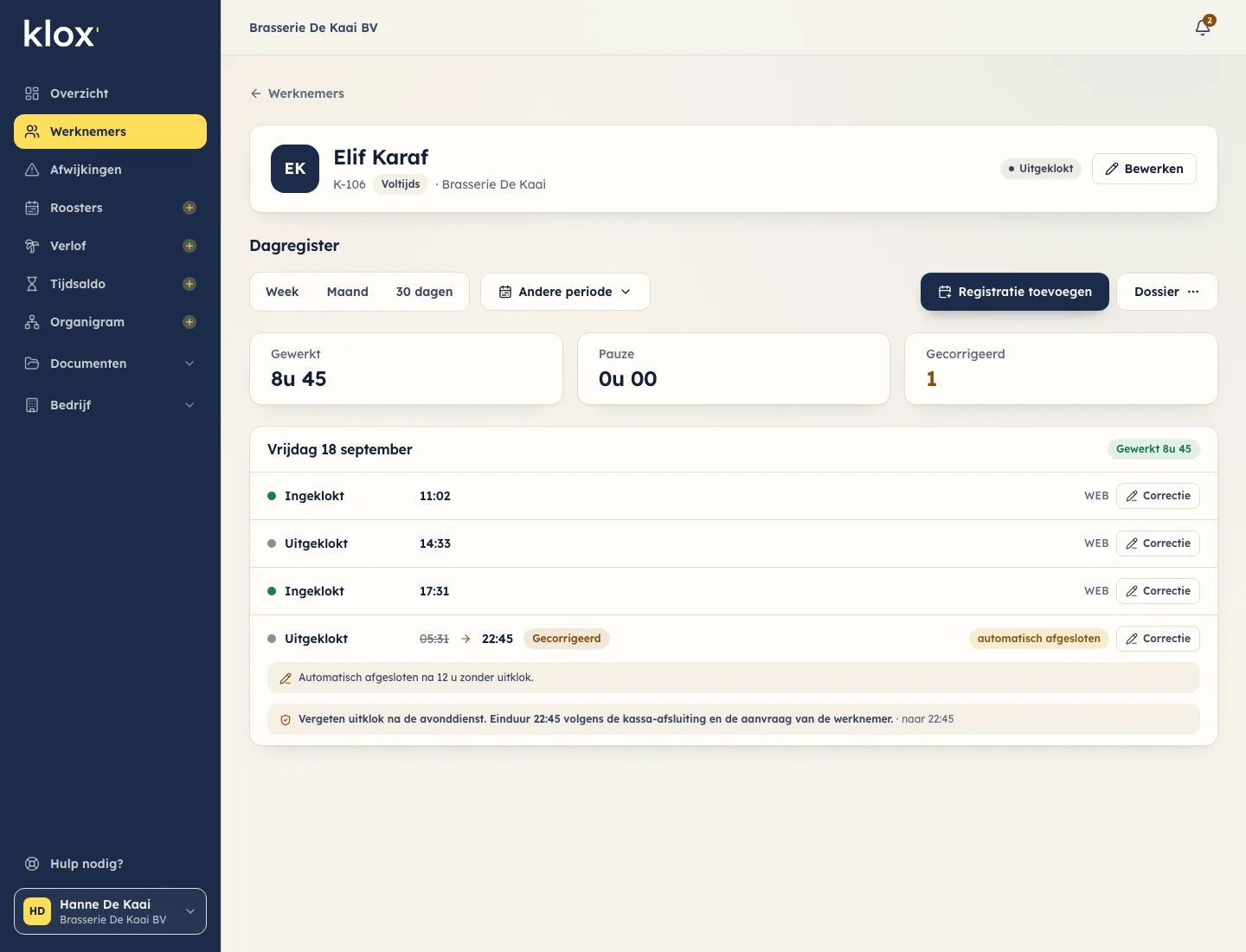
1. Friday 18/09, 17:31: clocked in, not clocked out
Elif clocks in for the evening shift and forgets to clock out after closing. The shift stays open.2. Saturday 19/09, 05:31: closed automatically
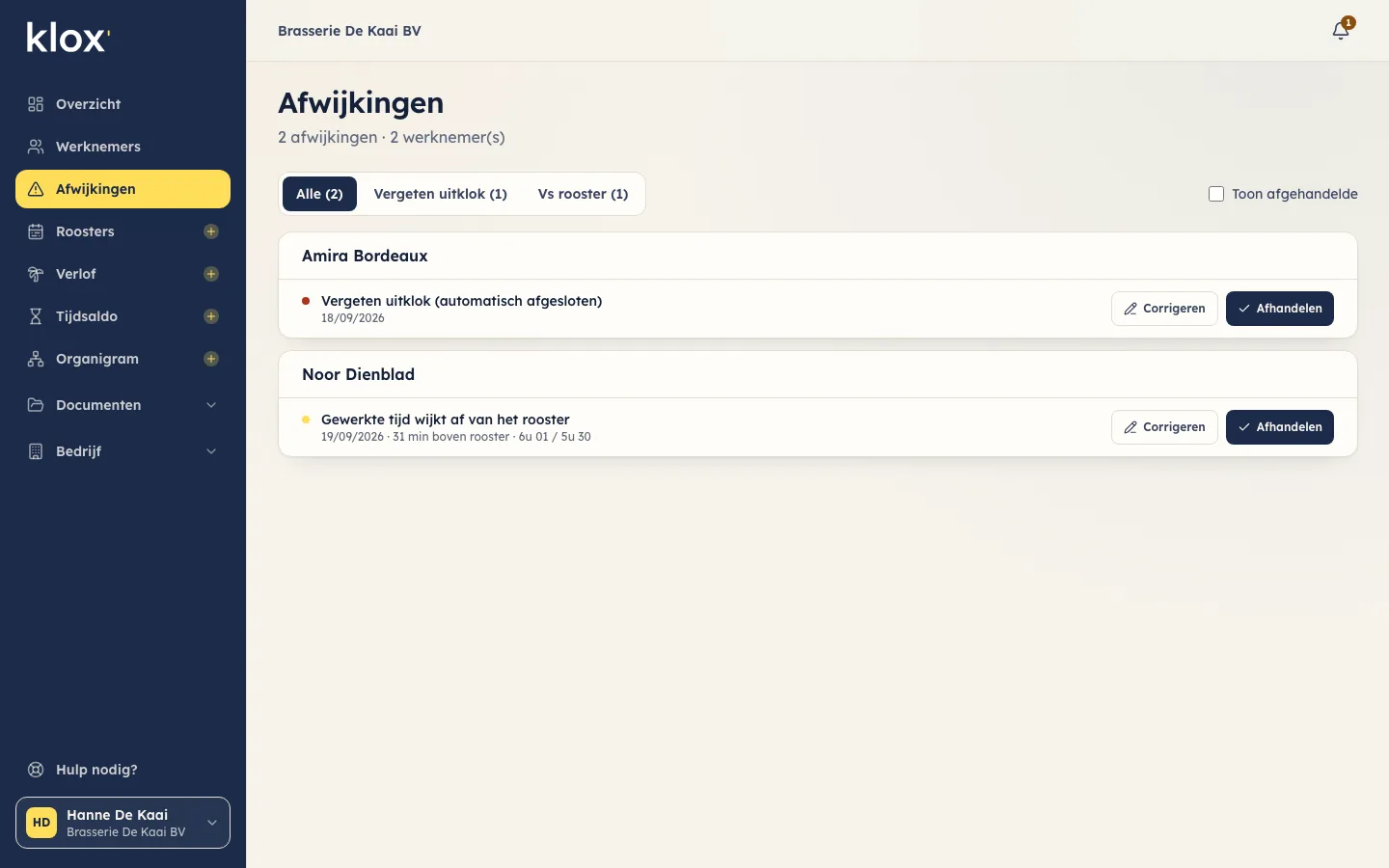
After twelve hours without a clock-out, Klox closes the shift with a separate registration, marked as automatic. Twelve hours is the default; the managing director can change that number of hours or switch off automatic closing. The automatic closing appears in the list of deviations.3. The employee requests a correction
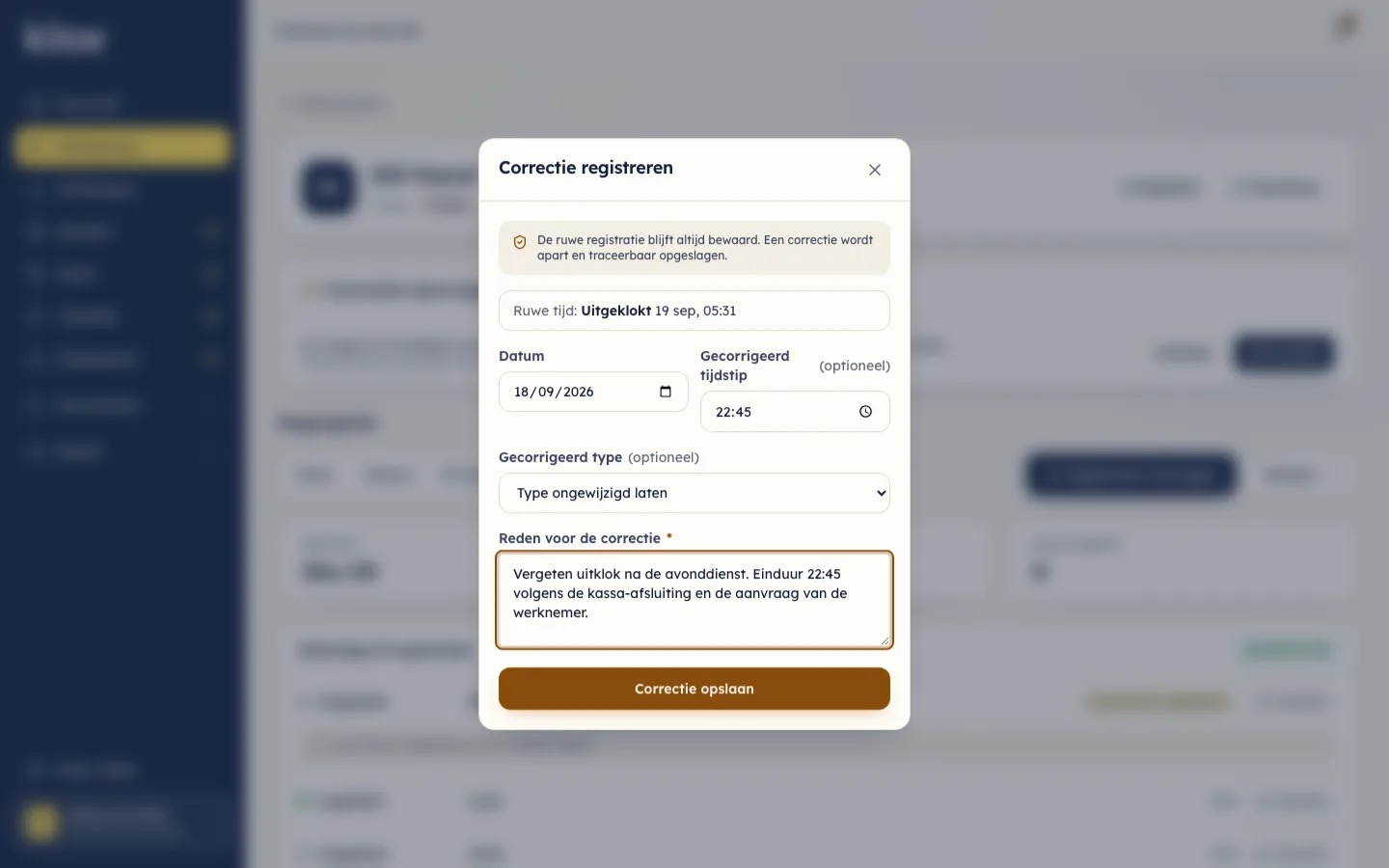
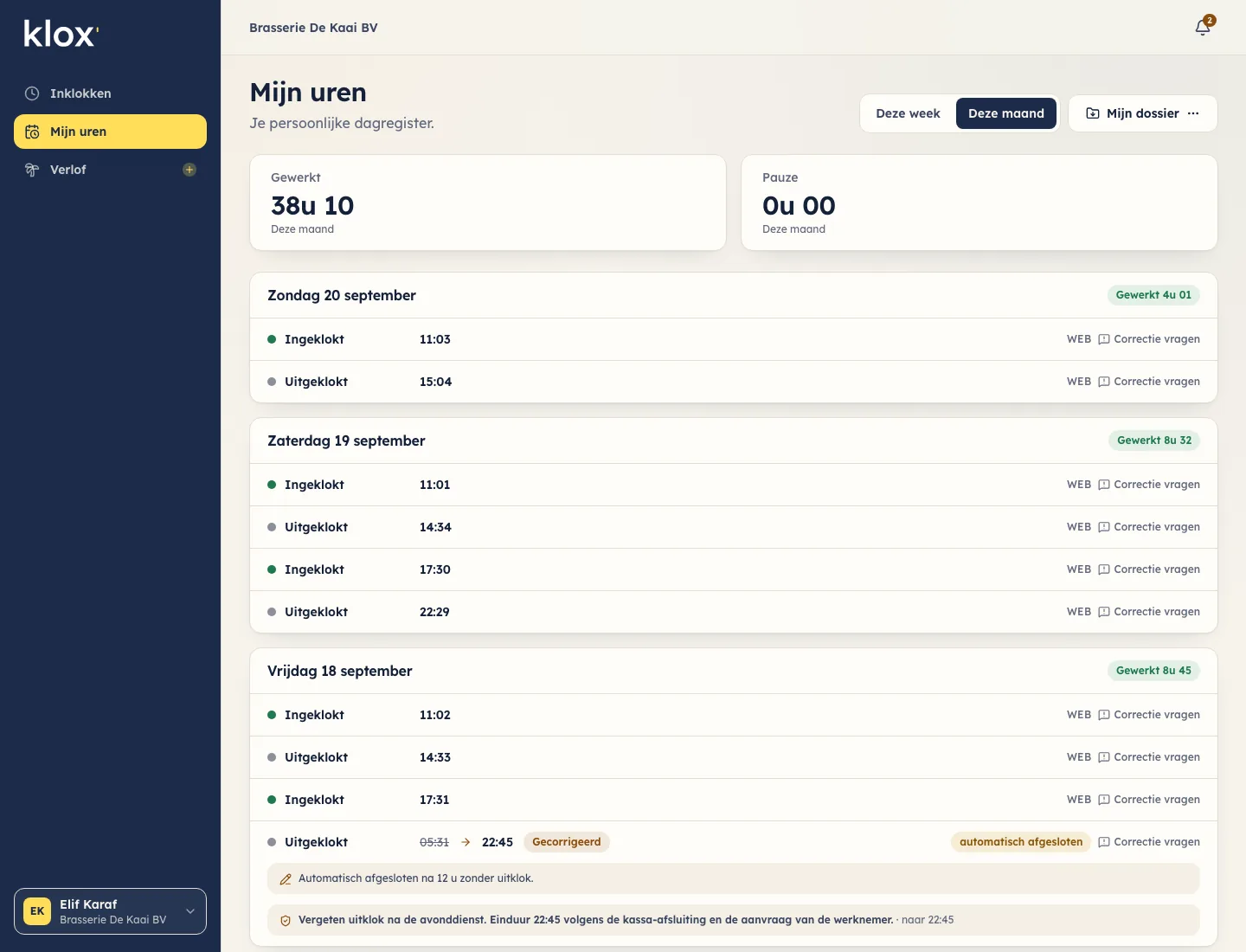
Elif sees in My hours that her shift was closed automatically, and requests a correction with her own explanation: she stopped at 22:45. The request goes to the managing director.4. The managing director records the correction
Hanne, the managing director, checks the end time against the till closing and records a correction to 22:45, with that reason. She then handles the request.5. Everything stays visible
The automatic clock-out of 05:31 is kept and shown struck through next to 22:45. The audit log records the automatic closing, the request and the correction with timestamp and author. The export shows the same.
How a correction works
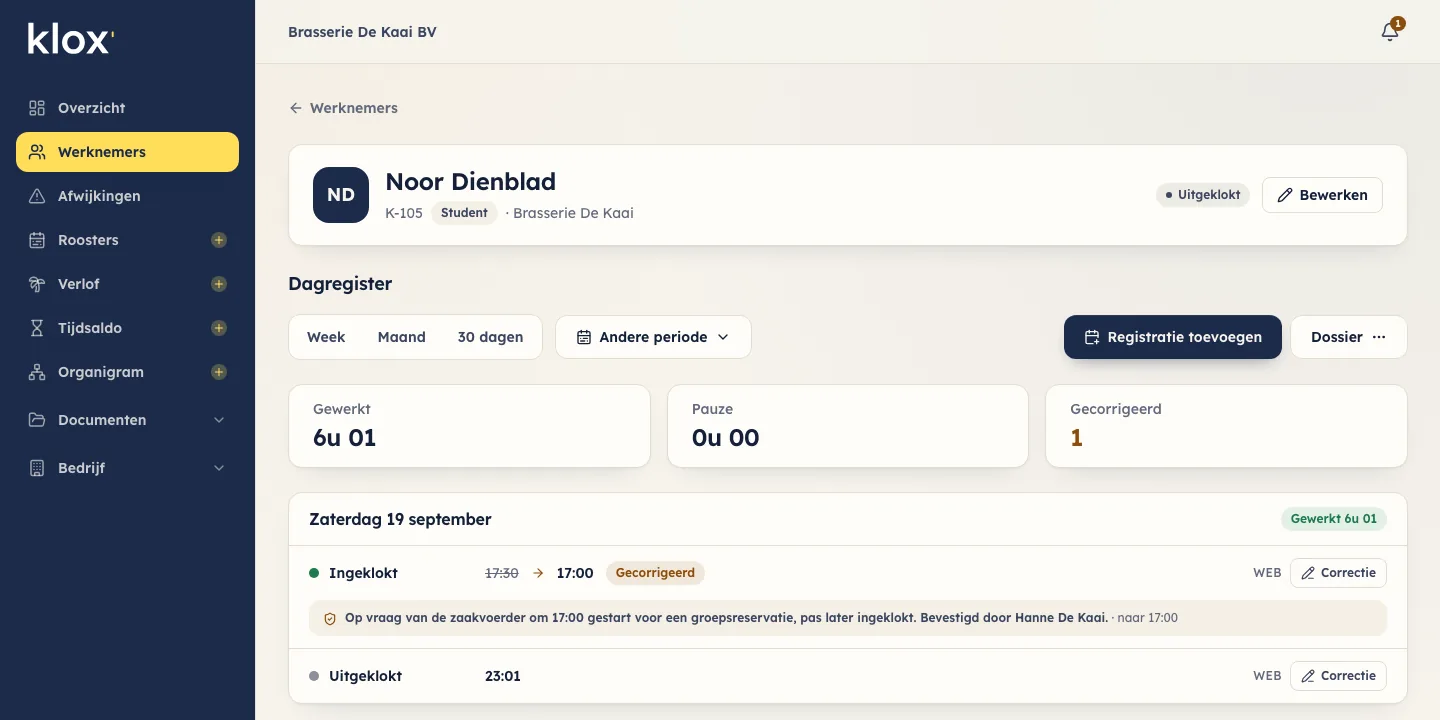
Second case from the example: student worker Noor Dienblad started on Saturday 19/09/2026 at 17:00 at the managing director's request, but only clocked in at 17:30. The managing director sets the clock-in to 17:00 and writes down why.
What the rule says
What Klox does
What makes a correction strong is the reason. “Adjusted” tells an outsider nothing. “End time 22:45 according to the till closing and the employee's request” says where the new time comes from and who confirms it.
What the employee sees
With flexible working hours, the time-tracking system must be accessible to the employee.[2] Separately, every employee has the right under the GDPR to access, and get a copy of, their personal data.[8]
In Klox, employees see under My hours the same registrations and corrections as the employer, with the reason. From there, they request a correction and export their own file as PDF or CSV. Employees only see their own registrations.
Checklist: how to prepare the file
What you arrange in advance, you do not have to look up during an inspection.
- Know which arrangement each employee falls under: fixed schedule, flexible working hours, part-time with a fixed or variable schedule, flexi-job or student worker.
- Make sure there are no open shifts left in the period you want to present. Deal with deviations while the shift is still fresh in everyone's memory.
- Give every correction a reason an outsider understands, with the source of the new time (till closing, schedule, confirmation by a colleague).
- Make one test export per employee and period, and read it as if you did not know the business.
- Check that your work regulations describe how work is measured and monitored, and that the inspectorate has the current version.[6]
- Make sure employees know where they can view their own registrations.
- Keep registrations for at least five years where the law requires it, and keep variable schedule notices for part-time workers for one year.[3]
- Agree who pulls the file when you are not there. In Klox, the managing director, a manager (optionally limited to their teams) and the HR role can make an export.
What an export does not do
An export shows what has been recorded. It does not make an incomplete registration complete or a wrong time correct. Klox has no certification or official approval as a registration system. The technical requirements of the announced general obligation have also not been settled yet.[1]
What Klox does do: keep data for five years by default (the period the law requires for, among other things, flexible working hours and deviations by part-time workers), record every export itself in the audit log, and keep the export available even when your subscription is blocked. Klox is not a registered cash register system and has no link with Dimona. What else the product does is on the features page.
Sources
- [1]Motion for a resolution on the registration of working time, DOC 56 1353/001 (in Dutch and French), Belgian Chamber of Representatives, accessed on 22/09/2026
- [2]Labour Act of 16 March 1971, Art. 20ter (in Dutch), Belgian Official Gazette (Justel), accessed on 22/09/2026
- [3]Monitoring the hours of part-time workers (in Dutch), FPS Employment, Labour and Social Dialogue, accessed on 22/09/2026
- [4]Flexi-jobs (in Dutch), National Social Security Office (RSZ/ONSS), accessed on 22/09/2026
- [5]Social documents (in Dutch), FPS Employment, Labour and Social Dialogue, accessed on 22/09/2026
- [6]Act of 8 April 1965 establishing work regulations, Art. 6 and 15 (in Dutch), Belgian Official Gazette (Justel), accessed on 22/09/2026
- [7]Judgment of 14 May 2019, CCOO, C-55/18, Court of Justice of the European Union (EUR-Lex), accessed on 17/10/2026
- [8]Regulation (EU) 2016/679 (GDPR), Art. 15, EUR-Lex, accessed on 17/10/2026
Further reading
- Time registration mandatory in 2027?What already applies and what is still open, with sources.
- Time registration in the work regulationsThe procedure for updating your regulations, step by step.
- Time registration and privacyWho may see which registrations, and what employees may view.
- Time registration in hospitalitySplit shifts and forgotten clock-outs in a real working week.
- Klox features
See how Klox handles this for your team?
Try it free for fourteen days with your own team, no payment details needed. Your account is ready in a few minutes.