What the rules say about Excel and paper
Belgium currently has no general obligation to register the working time of every employee. It does exist for a number of arrangements, including flexible working hours (glijdende uurroosters), deviations for part-time employees, flexi-jobs and student work.[1] The Court of Justice of the European Union requires an objective, reliable and accessible system, but leaves the form to the member states.[2] A spreadsheet is therefore not prohibited as such. What counts is what the arrangement for your employees requires.
| Arrangement | What the rule requires | Excel or paper? |
|---|---|---|
| Flexible working hours | A time-tracking system with, per employee, their identity and, per day, the duration of the work performed, accessible to the employee and the inspectorate, kept for five years.[3] | The law does not mention a mandatory form. The employee and the inspectorate must be able to consult it. |
| Part-time employee, deviation from the schedule | A deviation document, or a time-tracking system that records the start and end of work and breaks at the moment they start or end. Kept for five years.[4] | Possible on paper, but following the model of the Royal Decree (KB) of 08/03/1990 and filled in at the time, not afterwards. |
| Flexi-job | Attendance registration via, among others, the registered cash register system, ASA linked to Dimona, the electronic time-tracking system for part-time employees or a daily Dimona with start and end time.[5] | A paper list or a standalone Excel file is not in that list. |
Example: the same correction in Excel and in Klox
A fictitious brasserie in Ghent. Student worker Noor starts on Saturday 19/09/2026 at 17:00 at the manager's request, for a group booking, but only clocks in at 17:30. She finishes at 23:01. The manager confirms she started at 17:00 and wants to correct the register.
In Excel
The manager opens the file and types 17:00 over 17:30. The formula recalculates the day.
| Moment | In | Out | Worked | What a reader sees |
|---|---|---|---|---|
| Before the change | 17:30 | 23:01 | 5h 31 (5.52 hours) | One cell with 17:30 |
| After the change | 17:00 | 23:01 | 6h 01 (6.02 hours) | One cell with 17:00. No trace of 17:30, no reason, no name. |
For anyone reading the file later, 17:00 is simply the start time. That the original registration was 17:30, who changed it, when and why, is recorded nowhere. Some cloud versions of Excel keep a version history, but it does not ask for a reason, is usually not visible to the employee and disappears when someone copies or re-saves the file. If the change was correct, you did nothing wrong. You just can no longer prove it.
In Klox
The manager opens Noor's daily register and records a correction: new time 17:00, with a mandatory reason. The clock event at 17:30 remains.
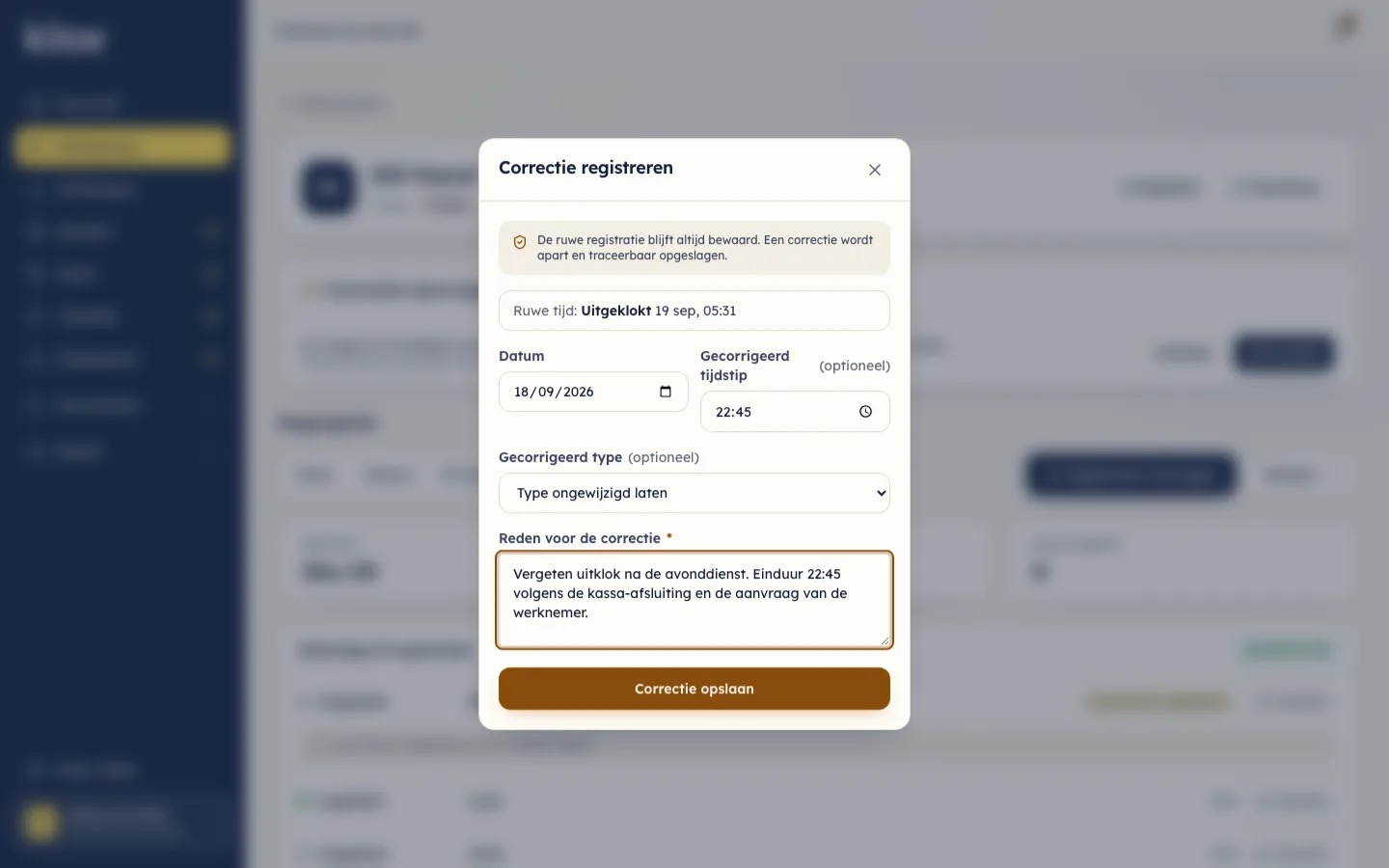
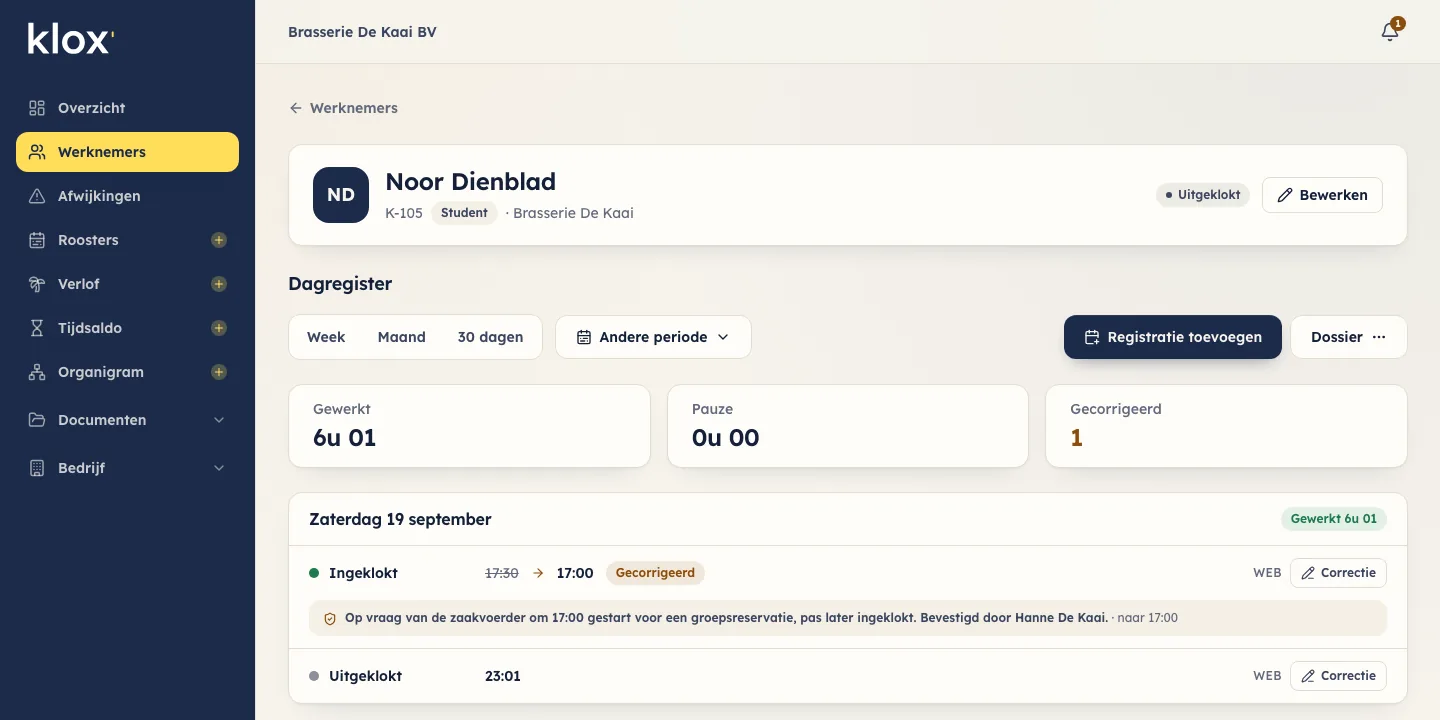
The register shows the same 6h 01 as the Excel file, but also the story behind it. For each clock event, the export contains the original time, the reason, the author and the time of the correction. Noor sees the correction in her own "My hours" overview.
What the rule says
What Klox does
Excel, paper and a registration system side by side
In fairness: Excel and paper have real advantages. They cost nothing extra, everyone knows them and you depend on no provider. The drawbacks show when someone asks questions later.
| Criterion | Excel | Paper | Klox |
|---|---|---|---|
| Time recorded at the moment itself | Only if someone fills it in straight away | Only if someone fills it in straight away | Yes, when clocking in; online with the server time |
| A change stays visible | No, a cell is overwritten | Partly: crossing out stays visible, erasing or writing over does not | Yes, the original stays next to the correction |
| Reason and author of a correction | Only if you keep a column for it yourself | Only if you write it down and initial it | Mandatory reason; author and time automatic |
| Access for the employee | Only if you share the file | Only if the list is available for inspection | Own "My hours" page with export buttons |
| Administration | Files per month, formulas, versions that drift apart | Handing out, collecting and archiving lists | Accounts and schedules; the daily register follows by itself |
| Backup | Your own responsibility | One copy, unless you copy or scan it | Stored centrally by Klox, not on one laptop |
| Export for an inspection | Put together yourself per employee and period | Look up folders and photocopy | File per employee and period as PDF or CSV |
| Keeping records for five years | Arrange it yourself, also after changing PCs | Archive it yourself | At least 60 months; a shorter period cannot be set |
| Cost | Usually no extra licence | Paper and time | Subscription per employee, see pricing |
On access: under the GDPR, every employee has the right to access and receive a copy of their personal data, and their registrations are part of that.[6] With flexible working hours, the system must also be accessible to the employee.[3] With an Excel file on the manager's laptop, that means a separate request every time.
Sticking with Excel? How to make it more reliable
If you work with two or three employees on fixed hours, a well-kept spreadsheet can be enough for now. These agreements close the biggest gaps:
1. One row per clock event, filled in at the time
Not from memory at the end of the week. For part-time employees with a time-tracking system, registering at the moment itself is the rule.2. Never overwrite
Correct a mistake with a new row: original time, new time, reason, who changed it and when. The old row stays.3. Lock in the monthly overview
At the end of every month, save a PDF and have the employee see or sign it. That way you can check later what it said at the time.4. Give your employees access
Share the overview, or provide a copy of their own data on request.5. Store it in at least two places
Make a backup outside your own PC and keep the files for as long as the period that applies to your arrangement: five years for flexible working hours and part-time employees.
If you notice you cannot keep up those agreements, or the team grows, that is the moment to switch.
Excel, paper or an app: what fits your business?
None of the three is generally prohibited or mandatory today. The choice depends on who works for you and under which arrangement. A fair rule of thumb per situation:
| Your situation | Excel or paper | An app |
|---|---|---|
| 2 or 3 employees, fixed hours, no part-time employees or flexi-job workers | Can be enough, if you keep up the agreements above | Handy, but not necessary |
| Part-time employees who deviate from their schedule | A deviation document following the model of the Royal Decree of 08/03/1990, filled in at the time | A time-tracking system that records start, end and breaks at the time replaces that document |
| Flexi-job workers with a written agreement | Not among the options the RSZ/ONSS lists | The electronic time-tracking system is listed; have it confirmed whether your system is enough |
| Several worksites or shifts, or employees on the road | Collecting lists per location, a lot of retyping | Every employee clocks in where they are; one register |
| You want to make corrections demonstrable | Only with strict discipline: new row, reason, name | Original and correction stay side by side |
The row on part-time employees follows FPS Employment.[4] The row on flexi-jobs follows the National Social Security Office (RSZ/ONSS).[5] More on this in the deviation register for part-time workers and attendance registration for flexi-jobs. What an app costs compared with your own time in Excel, you can work out in how much does time registration cost?
From Excel to Klox
Klox does not currently import old Excel registrations. So you keep your existing files as they are, for the period that applies to your arrangement, and Klox registers from the first day your team clocks in. Which clock-in method suits your workplace is explained on digital time clock.
If you are used to Excel, you do not lose it: the CSV export from Klox opens in Excel, with for each clock event the date, the time, the source and every correction with the original time, reason and author.
Real export from Klox with fictitious data, in Dutch: one employee of a fictitious brasserie, week of 14/09/2026 to 20/09/2026. Semicolon-separated, opens in Excel.
What Klox costs for your number of employees is on the pricing page. Want to see how it works first? Get in touch.
Frequently asked questions
- Can I keep time registration in Excel?
- There is no general ban. The arrangements that require a registration today do not always prescribe an electronic form, and the Court of Justice of the European Union leaves the form to the member states. For flexi-job workers with a written agreement, however, a standalone Excel file is not among the options the RSZ/ONSS lists.
- What is the biggest drawback of Excel?
- Overwriting a cell leaves no trace: who changed what, when and why cannot be proven afterwards. On top of that, access for the employee and keeping records for five years depend on your own discipline.
- Is a paper list enough?
- Sometimes. For part-time employees, a paper deviation document is possible, following the model of the Royal Decree of 08/03/1990 and filled in at the time. A list filled in afterwards does not meet that rule.
- When is it better to switch to an app?
- If you have part-time employees or flexi-job workers, work in several places, want to make corrections demonstrable or notice that you cannot keep up the agreements around your spreadsheet.
- Can I import my Excel files into Klox?
- No, Klox does not currently import old Excel registrations. You keep your existing files as they are, and Klox registers from the first day your team clocks in. The Klox export does open in Excel.
Sources
- [1]Motion for a resolution on the registration of working time, DOC 56 1353/001 (in Dutch), Belgian Chamber of Representatives, accessed on 22/09/2026
- [2]Judgment of 14 May 2019, CCOO, C-55/18, Court of Justice of the European Union (EUR-Lex), accessed on 17/10/2026
- [3]Labour Act of 16 March 1971, article 20ter (in Dutch), Belgian Official Gazette (Justel), accessed on 22/09/2026
- [4]Monitoring the hours worked by part-time employees (in Dutch), FPS Employment, Labour and Social Dialogue, accessed on 10/10/2026
- [5]Flexi-jobs (in Dutch), National Social Security Office (RSZ/ONSS), accessed on 10/10/2026
- [6]General Data Protection Regulation (GDPR), Article 15, EUR-Lex, accessed on 17/10/2026
Further reading
- Free templatesA weekly timesheet and a deviation register, in Excel and PDF.
- How much does time registration cost?Worked examples for 5, 12 and 20 employees, next to your own time in Excel.
- Digital time clockWhich clock-in method suits your workplace, and what Klox offers today.
- The inspection fileWhat an export for the inspectorate contains, with an example.
- Time registration for part-time employees
- Time registration with flexible working hours
- Time registration mandatory in 2027?
- Pricing
See how Klox handles this for your team?
Try it free for fourteen days with your own team, no payment details needed. Your account is ready in a few minutes.