What the register of comments is
If you have no works council (ondernemingsraad), you draw up new work regulations or an amendment yourself and make the draft known by posting it. For 15 days from the day of posting, the employer keeps a register available in which the employees can record their comments.[1] That is the register of comments.
A works council is mandatory from an average of 100 employees.[3] For an SME with 1 to 20 employees, this register is therefore the normal way to consult staff, for example when you amend the article on measuring and monitoring work because you are introducing time registration. The full procedure is in the guide amending the work regulations for time registration.
Who may write in it, with or without a name
The employees write in the register: individually, through a staff delegation or through the union delegation.[1] The register is there for them; the employer makes it available and closes it.
The law does not say whether a comment in the register must carry a name or a signature. The template leaves room for one, but does not make it mandatory. If an employee does not want the employer to know who a comment comes from, there is a second route: within the same 15 days, a duly signed letter to the social law inspector. The inspector may not disclose or publish their name.[1]
When and for how long the register is available
The register is ready from the day you post the draft, and stays available for 15 days.[1] In the guide we use, as an example, a posting on 05/10/2026 and a period that ends on 20/10/2026. How exactly you count (whether the day of posting counts, what a Sunday or public holiday does) is not stated explicitly in article 12. So leave a margin.
The law does not say where the register must be kept. Put it next to the posted draft, in a place every employee can reach without having to ask, and fill in that place at the top of the template. If you have several worksites, one register per worksite is the simplest way to give everyone the chance to respond.
What happens after the 15 days
As soon as the period has passed, the employer sends the register to the social law inspector for inspection.[1] There are then two possibilities:
| Situation | Consequence |
|---|---|
| No comments in the register and no letters to the inspector | The new regulations or the amendment take effect on the fifteenth day after the posting. |
| There are comments | The inspector passes them on to the employer within four days, and the employer posts them. The inspector tries to reconcile the views within thirty days. If that succeeds, the text takes effect on the eighth day after the reconciliation. |
| Reconciliation fails | The dispute goes to the competent joint committee. The text takes effect 15 days after its decision, unless another date has been set. |
The final regulations or the amendment are dated and signed by the employer and include the certificate that the employees have been properly consulted.[1] Within eight days of taking effect, a copy goes to the social law inspectorate (Toezicht op de sociale wetten), online via arbeidsreglement.belgie.be with your eID.[1][2] How long you must keep the register itself, we did not find in the law. Keep a copy with your regulations, so you can show later that you consulted staff.
The template
The template has three parts: a header the employer fills in before posting the draft, the table for the comments, and a closing section after the 15 days. Copy it into a document, or print this page. The downloadable template (PDF and Word) is currently only available in Dutch.
In Dutch. A4 landscape, two pages. Template, not an official form.
In Dutch. Same content, opens in Word or LibreOffice.
Header, to be filled in by the employer
| Field | To fill in |
|---|---|
| Company (name and address) | |
| Company number | |
| The draft concerns (new regulations, or which amendment) | |
| Date the draft was posted | |
| Last day of the 15-day period | |
| Place where the draft and this register can be consulted |
Explanation for employees, at the top of the register
"Write your comments on the posted draft below, yourself or through a staff or union delegation. Each comment gets its own line. The law does not require a name or signature, so these columns are optional. Within the same 15 days you can also send your comments in a signed letter directly to the social law inspector, who may not disclose your name."
Table for the comments
| No. | Date | Name or delegation (optional) | Article or subject of the draft | Comment | Signature (optional) |
|---|---|---|---|---|---|
| 1 | |||||
| 2 | |||||
| 3 |
Closing section, to be filled in by the employer
| Field | To fill in |
|---|---|
| Register closed on | |
| Number of comments in this register | |
| Sent to the social law inspector for inspection on | |
| Name and signature of the employer |
At the bottom of each page, state: "Klox template (klox.be/en/guides/work-regulations-comments-register), version 17/10/2026. This is a tool, not an official form and not legal advice: the law does not prescribe a template. Check the procedure and the deadlines with your social secretariat or legal adviser."
A completed example
Fictitious example. Buurtwinkel 't Mandje BV, Voorbeeldstraat 12, 2000 Antwerp, company number BE0000000194 (a dummy number, not a real company). Manager Karel Mandje amends the article on measuring and monitoring work: from November 2026 the three employees clock in via the browser. He posts the draft on Monday 05/10/2026, next to the staff entrance, and puts the register beside it.
| No. | Date | Name or delegation (optional) | Article or subject of the draft | Comment | Signature (optional) |
|---|---|---|---|---|---|
| 1 | 07/10/2026 | Ines Etiket | Article 9, registration of working time | I work part-time and sometimes stay longer on Saturdays. Can I see for myself which hours are registered for me, and how do I ask for a correction if I forget to clock out? | I. Etiket |
| 2 | 14/10/2026 | Article 9, registration of working time | Do I have to clock in with my own phone? Not everyone wants that. I would also like a device in the shop. |
| Field | Filled in |
|---|---|
| Register closed on | 20/10/2026 |
| Number of comments in this register | 2 |
| Sent to the social law inspector for inspection on | 21/10/2026 |
| Name and signature of the employer | Karel Mandje |
Because there are comments, the amendment does not take effect automatically on 20/10/2026. The inspector passes the comments on to Karel, who posts them, and tries to reconcile the views. In the guide, the example continues to a reconciliation on 12/11/2026 and an entry into force on 20/11/2026.
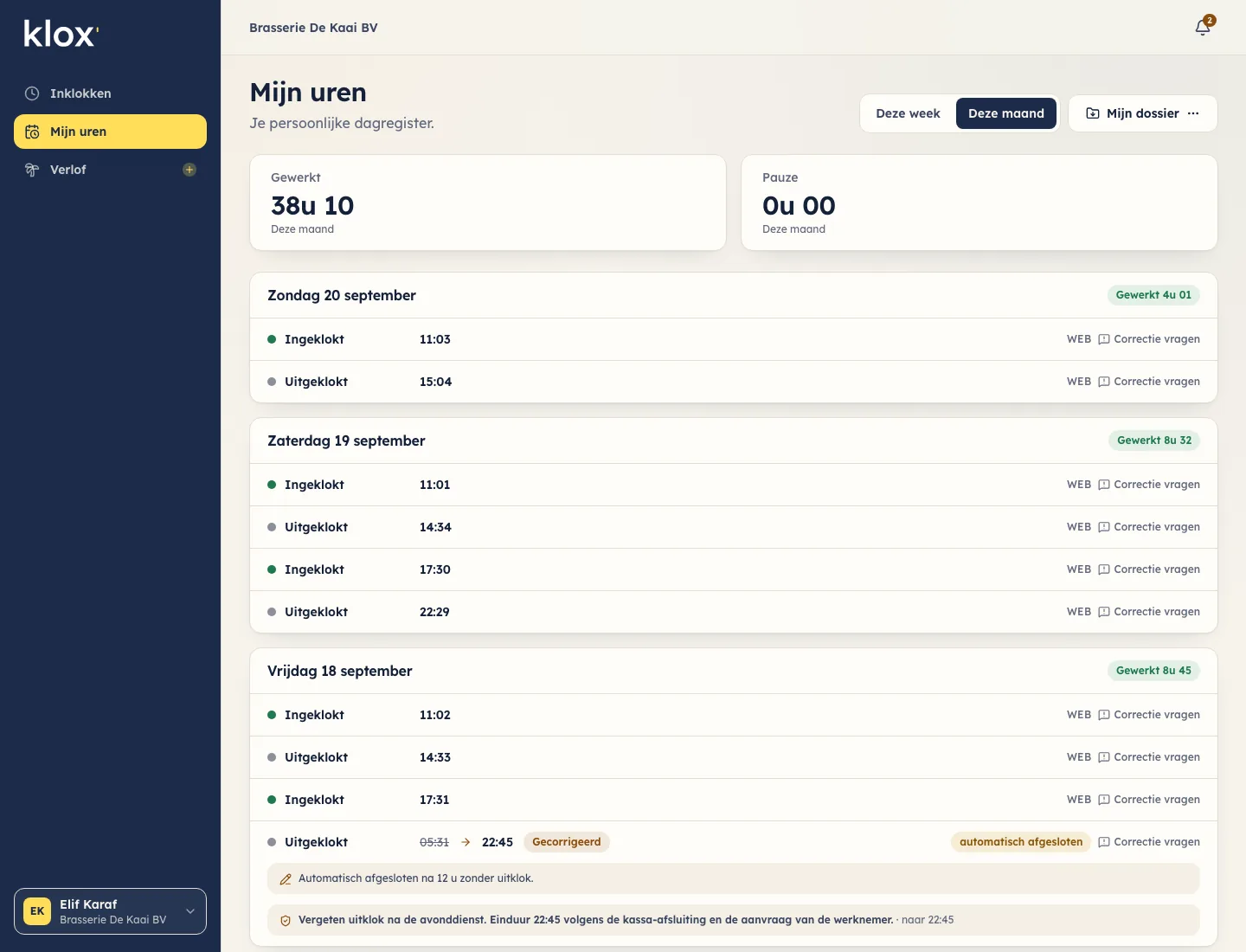
The first comment has a concrete answer. In Klox, Ines sees her own registrations and corrections under "My hours", and requests a correction that goes to the manager. For the second comment, Karel has to choose an answer himself. With Klox, every employee currently clocks in via a browser in which they are signed in, on their own device or on a company device. It is also possible with a badge at the Klox Kiosk.
Instructions for filling it in
1. Fill in the header before posting
Name and address, company number, what the draft changes, the date of posting, the last day of the period and the place where the register is kept. That way everyone knows what they can respond to and until when.2. Put the register next to the draft
On the day of posting, in a place everyone can reach without going through someone else. Give a copy of the draft to anyone who asks; every employee is entitled to one.3. Let employees write themselves
One comment per line, with a date. Name and signature are optional. Do not change anything an employee wrote, and do not remove any pages.4. Mention the second route
The explanation at the top of the template says employees can also write to the inspector with a signed letter. Leave that sentence in.5. Close it after the 15 days
Note the closing date and the number of comments, even if that is zero, and sign.6. Send the register to the inspector
For inspection, as soon as the period has passed, even if the register is empty. Note the date it was sent in the closing section and keep a copy.
You write the text of the draft itself separately. For the article on time registration, you can start from a draft made with the work regulations generator, and have it checked before you post it. What is and is not yet laid down by law on time registration is on the page about time registration and the 2027 law.
What the rule says
What Klox does
Sources
- [1]Act of 8 April 1965 establishing work regulations (consolidated text, art. 12, 13 and 15) (in Dutch), Justel, FPS Justice, accessed on 22/09/2026
- [2]Work regulations (in Dutch), FPS Employment, Labour and Social Dialogue, accessed on 22/09/2026
- [3]Works councils (in Dutch), FPS Employment, Labour and Social Dialogue, accessed on 22/09/2026
Further reading
- Amending the work regulations for time registrationThe full procedure, with and without a works council, and a timeline.
- Work regulations generatorCreate a draft article on time registration for your draft regulations.
- Time registration mandatory in 2027?What already applies and what has only been announced.
See how Klox handles this for your team?
Try it free for fourteen days with your own team, no payment details needed. Your account is ready in a few minutes.